Before we get into the technical details, it’s important to note that while the Stripe for WooCommerce plugin can store limited card information (such as brand and last 4 digits) for customers who choose to save their payment methods, storing this data yourself may have legal and compliance implications.
This guide focuses purely on the technical side: how to retrieve card details from Stripe (brand and last 4 digits) when a customer pays by card via the WooCommerce Stripe gateway, then store that information as order meta and optionally display it in the order details table.
Overview of the Approach
We’ll achieve this by:
- Hooking into the
woocommerce_pre_payment_completeaction, which fires just before WooCommerce completes a payment. - Checking that the order was paid using Stripe via a card.
- Looking for the Stripe Source ID or Payment Method ID in the order meta.
- Using the Stripe gateway’s
WC_Stripe_API::get_payment_method()method to fetch the full payment method from Stripe. - Saving the card brand and last 4 digits as order meta so we can use them later (for display, reporting, etc.).
Part 1: Base Function & Order Object
We’ll start by creating a function that receives the order ID from the woocommerce_pre_payment_complete hook, then loads the corresponding $order object:
function add_card_details_to_order_meta($order_id) {

	$order = wc_get_order( $order_id );

}Part 2: Check That the Order Used Stripe Card Payments
Next, we want to run this logic only when the order was paid with Stripe by card. We’ll:
- Check that the payment method is
stripe. - We also need to verify whether the payment method used is a credit card; this can be accomplished by checking the title of the payment method.
	if ($order->get_payment_method() === 'stripe') {
		$UPE = new WC_Stripe_UPE_Payment_Gateway();
		$default = new WC_Gateway_Stripe();

		$payment_method_title = strval(WC_Stripe_Feature_Flags::is_upe_checkout_enabled() ? $UPE->get_title() : $default->get_title());

		if ($order->get_payment_method_title() !== $payment_method_title) {
			return;
		}
		}
Part 3: Find the Stripe Source or Payment Method ID
Stripe’s WooCommerce gateway stores IDs in order meta, usually as _payment_method_id (for PaymentMethods) or _stripe_source_id (for legacy Sources). We’ll loop through the order’s meta entries, look for these keys, and store the first match we find.
$found = '';

// Looping through the order meta to check for the Stripe source ID or Payment method ID.

foreach ($order->get_meta_data() as $object) {
	$object_array = array_values((array)$object);
	foreach ($object_array as $object_item) {
		if ($object_item['key'] == '_stripe_source_id' || $object_item['key'] == '_payment_method_id') {
			$found = $object_item['value'];
			break;
		}
	}
}
Part 4: Retrieve Card Details from Stripe and Store Them
Now that we have the Stripe ID, we can call WC_Stripe_API::get_payment_method() to retrieve the full payment method object from Stripe. We’ll extract the card brand and last 4 digits, then save them as order meta (_card_brand and _card_last_4).
if ( !$order->meta_exists('_card_brand')) {
	$data_dump = WC_Stripe_API::get_payment_method($found);
	$cardBrand = $data_dump->card->brand;
    $last4digits = $data_dump->card->last4;
	$order->add_meta_data('_card_brand', $cardBrand);
	$order->add_meta_data('_card_last_4', $last4digits);
	$order->save();
}
Full Snippet: Save Card Brand & Last 4 to Order Meta
Here is the complete function with everything combined and hooked into woocommerce_pre_payment_complete:
function add_card_details_to_order_meta($order_id) {
// prevent fatal errors if the plugin is not activated.
if ( !is_plugin_active('woocommerce-gateway-stripe/woocommerce-gateway-stripe.php') ) {
return;
}
$order = wc_get_order($order_id);
if ($order->get_payment_method() === 'stripe') {
$UPE = new WC_Stripe_UPE_Payment_Gateway();
$default = new WC_Gateway_Stripe();
$payment_method_title = strval(WC_Stripe_Feature_Flags::is_upe_checkout_enabled() ? $UPE->get_title() : $default->get_title());
if ($order->get_payment_method_title() !== $payment_method_title) {
return;
}
$found = '';
// Looping throught the order meta to check for the Stripe source ID or Payment method ID.
foreach ($order->get_meta_data() as $object) {
$object_array = array_values((array)$object);
foreach ($object_array as $object_item) {
if ($object_item['key'] == '_stripe_source_id' || $object_item['key'] == '_payment_method_id') {
$found = $object_item['value'];
break;
}
}
}
// Check if data that we'll be adding already exist in the order, if not, lets add the card brand and last 4 digits from the $data_dump.
if ( !$order->meta_exists('_card_brand')) {
	$data_dump = WC_Stripe_API::get_payment_method($found);
	$cardBrand = $data_dump->card->brand;
    $last4digits = $data_dump->card->last4;
	$order->add_meta_data('_card_brand', $cardBrand);
	$order->add_meta_data('_card_last_4', $last4digits);
	$order->save();
}
}
}
add_action('woocommerce_pre_payment_complete', 'add_card_details_to_order_meta');
If you’re wondering where to put this code, the easiest option is to install the Code Snippets plugin, create a new snippet, paste the code above, and activate it.
Displaying the Card Brand & Last 4 Digits in the Order Details
Now that we’re saving the card brand and last four digits on each Stripe order, we can display them wherever we want. As a simple example, let’s add the “Paid with” line to the order details table on the “Order Received” page and the “My Account → Orders → View” page.
function display_custom_order_meta($order){
    // Get the custom meta data you want to display
    $card_brand = $order->get_meta('_card_brand');
    $card_last_4 = $order->get_meta('_card_last_4');

    // Check if the meta data exists before displaying it
	if ($card_brand && $card_last_4) {
		?>
			<tr>
				<th scope="row">Paid with:</th>
                <td><?php echo esc_html(ucfirst($card_brand) . " " . $card_last_4); ?></td>
			</tr>
		<?php
		} }


add_action('woocommerce_order_details_after_order_table_items', 'display_custom_order_meta');This will append a row to the order details table showing something like:
Paid with: Visa 4242
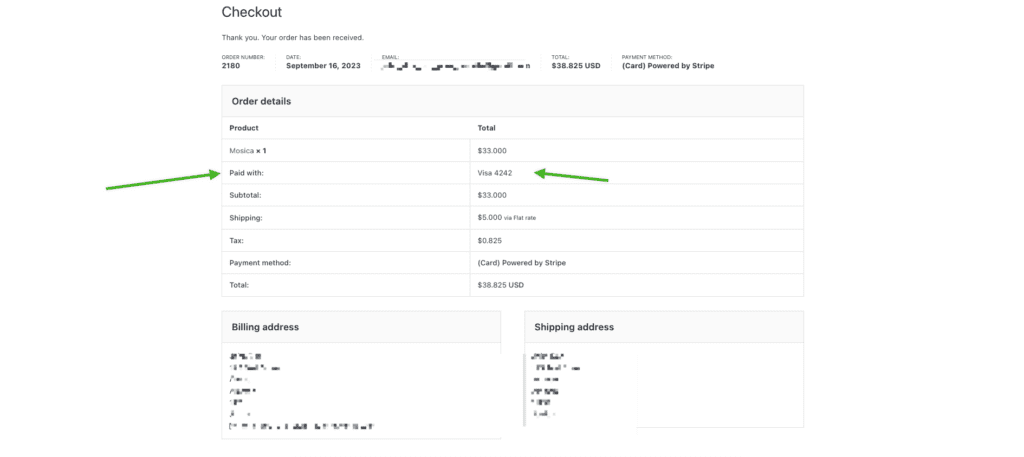
And that’s it. You’re now pulling the card brand and last four digits from Stripe and displaying them on your WooCommerce order details. If you want to extend this further (e.g. add it to emails, admin order screens, or reports), you can reuse the same meta keys: _card_brand and _card_last_4.


Leave a Reply